If you run a food blog on WordPress, your recipe card plugin is one of the most important technical decisions you will make. It affects how your recipes look on the page, whether Google can generate rich results from your posts, how fast your site loads, and how much you pay every year to keep things running.
The market for recipe card plugins has consolidated around a small number of well-known options: WP Recipe Maker, Tasty Recipes, and the Feast Plugin are the names you will see most often in food blogger communities. Each one has real strengths and real trade-offs.
This guide breaks down how each plugin performs on the criteria that actually matter for food bloggers in 2026: schema quality, SEO features, speed impact, design flexibility, ease of use, and cost. It also covers an alternative that most food bloggers have not considered: a purpose-built recipe website that handles all of this natively, without plugins or annual fees.
What to Look for in a Recipe Card Plugin
Before comparing specific plugins, it helps to be clear about what a recipe card plugin actually needs to do well.
Schema markup output. The plugin must output valid, complete recipe schema (JSON-LD format) that meets Google's current requirements. This is the technical foundation for rich results. If the schema is incomplete or broken, you lose eligibility for the recipe carousel, star ratings, and cook-time display in search results. No other feature matters if this is wrong.
SEO-specific fields. Beyond basic schema, look for support for keywords, recipe category, recipe cuisine, nutrition information, and aggregate ratings. The more complete the schema output, the richer the potential search result.
Page speed impact. Plugins add code to your page. Some add a lot of it. A plugin with heavy JavaScript or large CSS files will hurt your Core Web Vitals scores, which directly affects rankings. Speed impact varies significantly between plugins and is worth checking with PageSpeed Insights after installation.
Design and customization. Your recipe card should look consistent with your blog's aesthetic. Some plugins offer extensive styling options; others are more rigid. Consider how much control you want and how much time you are willing to spend on card design.
Ease of use. You will use this plugin for every recipe you publish. A clunky input interface adds friction to your workflow and makes updating old posts painful.
Cost. Most of the major recipe card plugins are paid products with annual license fees. Over three to five years, those fees add up. Factor in the real cost when comparing options.
There is a recipe website that handles all of this for free.
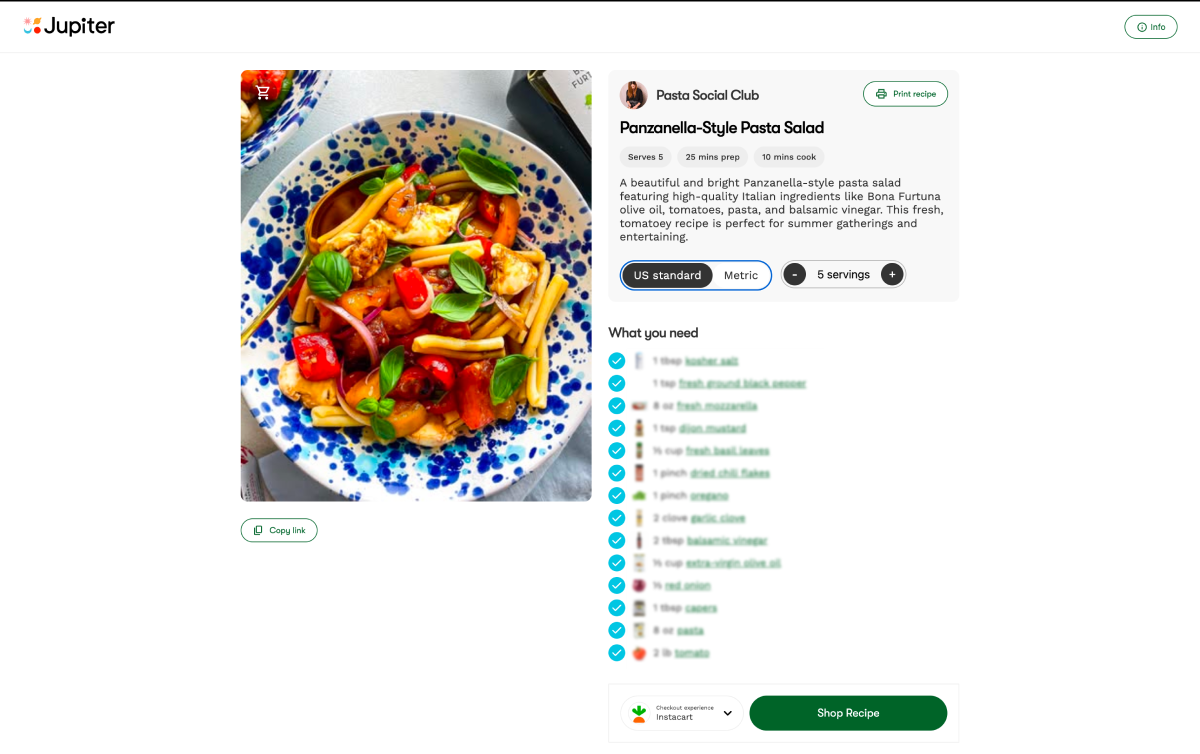
Jupiter gives food creators a free branded recipe website with a built-in recipe card: valid schema, clean design, and no annual plugin fees. You focus on the recipes. Jupiter handles the infrastructure.
WP Recipe Maker
WP Recipe Maker, commonly called WPRM, is the most widely used recipe card plugin among serious food bloggers. It has been around since 2016 and has built a reputation for comprehensive schema output and deep SEO functionality.
What it does well
WPRM's schema output is thorough. It covers all of Google's required and recommended fields including individual HowToStep instructions, nutrition information, aggregate ratings, and keywords. For food bloggers who have had schema problems with other tools, WPRM is often the fix.
The plugin offers extensive template customization. You can control colors, fonts, layout, and card style through a visual template editor without touching code. This makes it practical for food bloggers who want their card design to feel integrated with the rest of their site.
WPRM also has strong utility features: a built-in nutrition calculator (using a database of ingredients), a recipe scaling function that adjusts ingredient amounts based on serving size, a unit conversion toggle (metric/imperial), and a print view. These are features readers actively use, and they add genuine value to the recipe experience.
Where it falls short
The free version of WPRM is significantly limited. Most of the features food bloggers actually need, including the template customization, nutrition calculator, and scaling, are locked behind the paid tier. The full version costs $49 per year for a single site or $149 per year for up to 30 sites.
WPRM is also one of the heavier plugins in terms of page load impact. It loads a notable amount of JavaScript and CSS on every recipe page. On an already image-heavy food blog, this can push Core Web Vitals scores in the wrong direction if not carefully managed.
The interface for entering recipes is functional but dense. There are a lot of fields and a lot of options, which is powerful for advanced users but can feel overwhelming when you are simply trying to get a recipe published quickly.
Bottom line
WPRM is the right choice for food bloggers who want the most complete feature set available and are willing to pay for it. It is particularly well-suited to blogs with a high volume of recipes where the nutrition calculator and scaling features will get consistent use. The cost is real, and the speed impact requires attention, but for serious food bloggers it remains the benchmark.
Cost: Free (limited) or $49/year (single site) / $149/year (up to 30 sites)
Best for: Established food blogs that need the full feature set and can manage the speed trade-off
Tasty Recipes
Tasty Recipes is developed by WP Tasty, the same team behind the Tasty Pins and Tasty Links plugins. It is a strong, well-supported option with a clean interface and reliable schema output.
What it does well
Tasty Recipes produces clean, valid schema markup that covers Google's required and recommended fields. It handles HowToStep instructions correctly, supports nutrition information, and integrates with aggregate rating systems.
The recipe input interface is notably cleaner than WPRM. Entering a new recipe feels straightforward: the fields are laid out logically, the ingredient and instruction editors are easy to work with, and the overall experience is faster than the more feature-heavy alternatives.
Card design in Tasty Recipes is polished out of the box. The default card styles are clean and well-executed, and there are multiple card templates to choose from. For food bloggers who want a professional-looking card without spending time on design customization, Tasty Recipes gets there faster than most.
The plugin also integrates well with the broader WP Tasty ecosystem. If you already use Tasty Pins for Pinterest optimization or Tasty Links for affiliate link management, having all three from the same developer makes maintenance and support simpler.
Where it falls short
Tasty Recipes is a paid plugin with no meaningful free tier. The license costs $79 per year for a single site. There is no free version to test with real recipes before committing.
Customization depth is more limited than WPRM. The available card templates cover most use cases, but if you want granular control over every design element, Tasty Recipes will eventually hit a ceiling that WPRM would not.
The nutrition calculator requires a third-party integration (Nutritionix) rather than being built in natively. For bloggers who publish a high volume of recipes and want nutrition data on every post, this adds a step.
Bottom line
Tasty Recipes is an excellent choice for food bloggers who value a clean, fast workflow and a professional card design without extensive setup. It is particularly well-suited to bloggers who are already in the WP Tasty ecosystem. The price is higher than WPRM's entry tier, but the interface quality justifies it for many users.
Cost: $79/year (single site)
Best for: Food bloggers who prioritize workflow speed and clean design over maximum feature depth
Feast Plugin
Feast is different from WPRM and Tasty Recipes in an important way: it is not just a recipe card plugin. It is a full WordPress theme framework designed specifically for food bloggers, and the recipe card is one component of a larger system.
What it does well
Feast's biggest strength is performance. The Feast framework is built with Core Web Vitals as a primary design consideration. Sites running Feast consistently score well on PageSpeed Insights, which is a meaningful advantage for food bloggers trying to improve their Google rankings.
The recipe card outputs valid schema with the fields that matter for rich results. The card design is clean and intentional, consistent with Feast's overall aesthetic philosophy.
For food bloggers who want to overhaul their entire site's technical performance and design cohesion at once, rather than patching a theme with multiple plugins, Feast makes that case well.
Where it falls short
Feast is a significant commitment. It is a theme framework, not a standalone plugin. Switching to Feast means adopting its entire design and structural system, not just its recipe card. For a blog with an established design and a large library of customized content, migrating to Feast is a substantial project.
The cost reflects this scope: Feast starts at $99 per year and goes up depending on the tier. That is the highest entry price among the major options.
Feast is also less flexible for food bloggers who want a different visual direction than what the framework provides. The performance gains are real, but they come with design constraints.
Bottom line
Feast is best suited to food bloggers who are building or rebuilding their site and want to optimize for speed and cohesion from the ground up. It is a poor fit for bloggers who want to add a recipe card to an existing site without changing their theme.
Cost: Starting at $99/year
Best for: New food blogs or full site rebuilds where performance is the top priority
What if your recipe website came with all of this built in?
Jupiter's free recipe website includes a native recipe card with valid schema output, clean design, and no annual licensing fees. It is part of a platform that also connects you to 65+ CPG brand partnerships, Mediavine and Raptive ad network access, and Instacart affiliate integration. Over 1,000 food creators have earned $3M+ through Jupiter.
Side-by-Side Comparison
Here is how the three major plugins compare on the criteria that matter most:
Schema completeness: All three plugins output valid recipe schema that meets Google's requirements when configured correctly. WPRM has the most granular control over schema fields. Tasty Recipes and Feast both cover the essentials reliably.
SEO features: WPRM leads on depth: keyword fields, nutrition, scaling, ratings integration, and the most complete HowToStep output. Tasty Recipes covers the core SEO requirements cleanly. Feast covers what is needed for rich results within its framework.
Page speed impact: Feast is the performance leader by design. WPRM has the heaviest default footprint and requires caching and optimization work to reach strong Core Web Vitals scores. Tasty Recipes sits between the two.
Design flexibility: WPRM has the most customization options. Tasty Recipes offers clean templates with moderate flexibility. Feast provides strong design cohesion within its own system but limited flexibility outside of it.
Ease of use: Tasty Recipes has the cleanest recipe input workflow. WPRM is more complex to set up and use but more powerful. Feast requires adopting a full framework, which is the highest setup investment.
Annual cost: WPRM: $49/year (single site). Tasty Recipes: $79/year. Feast: from $99/year. All three have real ongoing costs.
The Plugin Alternative Worth Knowing About
Every plugin comparison eventually runs into the same underlying issue: these tools are built to solve problems created by building a food blog on generic WordPress infrastructure.
WordPress was not designed for food blogs. It does not know what a recipe is. It does not output recipe schema natively. It does not optimize images automatically for recipe use cases. It does not have Instacart affiliate integration or ad network connections built in. Plugins are the solution to all of these gaps, and each plugin adds cost, maintenance, and potential performance overhead.
A different approach is to build your recipe website on a platform that treats recipe publishing as the core function rather than something bolted on afterward.
Jupiter's free recipe website is built specifically for food creators. The recipe card is native, not a plugin. The schema output is built into the platform. The speed optimization is handled at the infrastructure level. There are no annual license fees because the recipe website is part of a broader monetization platform, not a standalone product.
For a food blogger who is just starting out and weighing a WordPress setup plus paid plugins against a purpose-built recipe website that costs nothing to launch, the comparison is worth taking seriously.
For an established blogger who has already invested in WordPress, plugins, and a large content library, switching platforms is a significant decision that deserves careful evaluation. The plugin options above are all solid within the WordPress ecosystem.
How to Choose
Choose WP Recipe Maker if:You want the most complete feature set available, you publish a high volume of recipes where the nutrition calculator and scaling features add real value, and you are prepared to invest in site speed optimization alongside the plugin.
Choose Tasty Recipes if: You want a clean, fast recipe input workflow, a professional card design without extensive setup, and you are already using or planning to use other WP Tasty plugins.
Choose Feast if: You are building or rebuilding your food blog from scratch and want to prioritize Core Web Vitals performance as a foundational decision, not an afterthought.
Consider Jupiter if: You are starting a new food blog and want recipe website infrastructure that handles schema, speed, and card design natively, with the added benefit of brand partnership access, ad network connections, and Instacart affiliate integration built in from day one, at no cost.
A Note on Free Plugin Options
There are free recipe card plugins available on the WordPress plugin directory. It is worth being direct about their limitations.
Most free recipe plugins output incomplete schema. Missing fields, broken HowToStep formatting, and absent nutrition data are common. These are not minor issues: they determine whether your posts are eligible for rich results. A recipe post that looks good on the page but has broken schema is invisible to Google's rich result systems.
If you are going to invest the time in building a food blog with a serious SEO strategy, the recipe card plugin is not the place to cut costs. Either use one of the paid options above or use a platform where the schema output is handled natively and correctly.
Skip the plugin fees. Get a recipe website built for food bloggers.
Jupiter gives food creators a free branded recipe website with a native recipe card, valid schema markup, and no annual plugin costs. Add brand partnerships with Banza, Pete and Gerry's, Bonafide Provisions, and General Mills, plus Mediavine and Raptive ad network access, and Instacart affiliate integration. Join 1,000+ food creators who have collectively earned $3M+ through the platform.